 Payhay
Every expense, recorded automatically
Payhay reads the notification your bank already sends you and saves the transaction — amount, direction, currency — with zero typing. No manual entry, ever.
Three steps. Zero typing.
Payhay runs quietly in the background. The moment your bank notifies you of a transaction, it's already in your ledger.
Your bank sends a notification
Exactly the same push alert you already get today — nothing new to install on the bank side.
On-device AI reads it
A small AI model running entirely on your phone works out the amount, currency and whether it's money in or out.
Saved automatically
The expense appears in your list instantly — no forms, no receipts to photograph, no manual entry.
A 30-second step for some banks
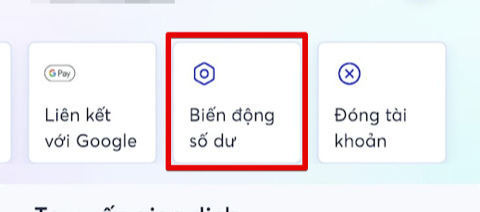
Open your account details and tap "Biến động số dư" (balance change).
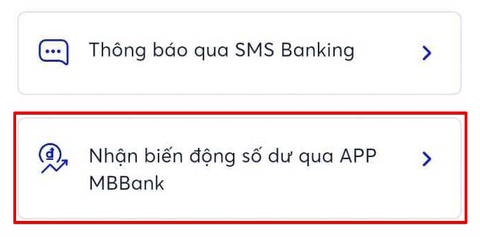
Choose "Nhận biến động số dư qua APP MBBank" (receive via the MB app).
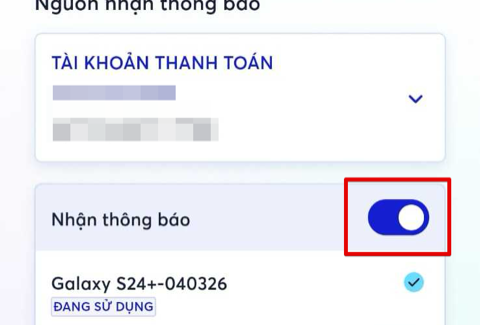
Turn on "Nhận thông báo" (receive notifications) for this device. Done — for good.
Watch a real transaction get captured
-
Multi-currencyVND, USD, SGD, EUR, GBP, JPY — detected automatically.
-
Direction-awareMoney in or money out — Payhay tells them apart on its own.
-
Any bank, any formatPayhay learns each bank's notification style the first time it sees it.
Your bank data never leaves your phone
-
On-device AI, alwaysNotification text is parsed entirely on your phone — never uploaded to any server.
-
Nothing to leakThere's no cloud copy of your transaction history to be breached in the first place.
-
Open about the restPayhay only makes network calls to download the AI model once and send error reports. It never automatically transmits your notification content.
Stop typing your expenses
Free to use. Set up in under a minute. Let your phone do the bookkeeping.
 Get it on Google Play